Orinj version 9.0.0
The Orinj Spectrum monitor (or spectrum analyzer) shows the amplitude of frequencies in the input signal at a point in time. It displays information about the signal but does not modify the signal.
Using the Orinj Spectrum monitor
The Orinj Spectrum monitor can be added to tracks, auxiliary channels, and the master channel in the session view and to waves in the wave view.
- To add the effect to a track or an auxiliary channel in the session, first click on the track or auxiliary channel to select it. Click on Effect, Other, and then on Orinj Spectrum Monitor in the menu.
- To add the effect to the master channel in the session, click on Track and then on Master Channel in the menu. In the master channel dialog, click on the Add button.
- To add the effect to a wave in the wave view, click on Effect, Other, and then on Orinj Spectrum Monitor in the menu.
You will see the following dialog.
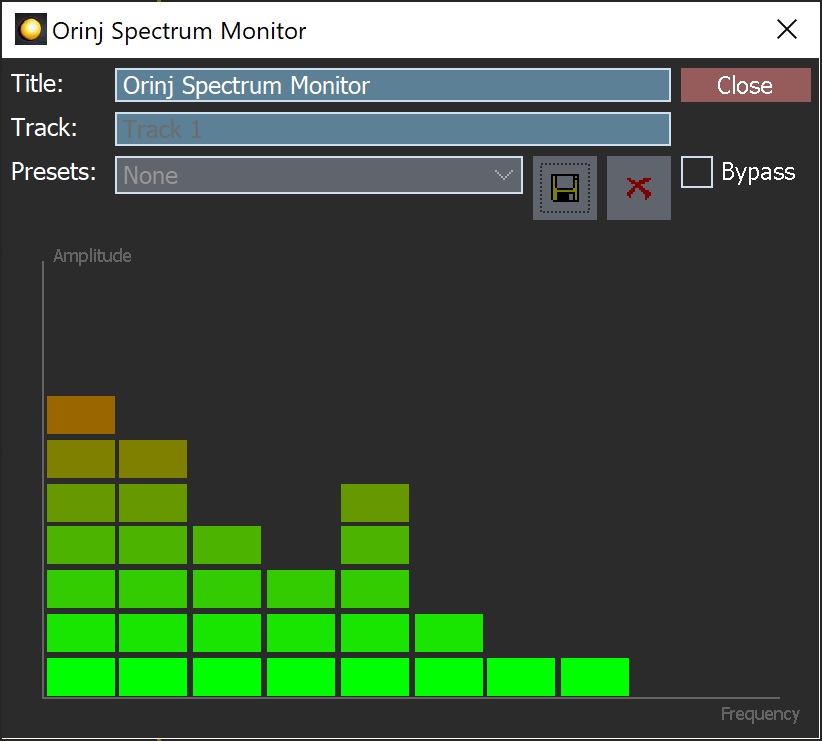
When this dialog becomes visible, the Orinj Spectrum monitor has been added.
The horizontal axis of the spectrum monitor is the frequency range. The frequency range changes depending on the sampling rate, as larger sampling rates permit larger frequency ranges. The frequency bands in the spectrum monitor split the frequency range exponentially.
The vertical axis is the amplitude of the frequency bands. This amplitude range uses decibels and ranges between -60 dB (bottom) and 0 dB (top), where 0 dB represents the maximum amplitude permitted by the signal sampling resolution.
The Orinj spectrum monitor analyzes the signal during playback, but not according to the precise playback timing. In Orinj, effects process the sound data before these data are sent to the output sound device. The spectrum monitor similarly computes information on what should be drawn before the corresponding sound data is sent to playback. It then attempts to show this information at the time of the corresponding playback but may display data earlier than its playback and may occasionally wait for data.
Orinj Spectrum monitor parameters
The Orinj Spectrum monitor has no parameters. It simply displays a plot of the sound data during playback.
Automations
The Orinj Spectrum monitor has no automations.
Add new comment