Orinj version 9.0.0
The Orinj Bouncing Echo is an echo in every sense of the word – the signal is repeated several times with a decay. It differs from the Orinj Echo, however. In the simple Orinj Echo, the time between each two successive repetitions is the same (there is constant delay) and the ratio of the amplitudes of each two successive repetitions is the same (there is constant decay). The Orinj Bouncing Echo is an echo with a delay sweep, as its delays can change with each repetition.
A practical example of this type of echo is a bouncing ball. Once the ball is dropped, it will bounce faster and faster as time passes, as each bounce will be of smaller and smaller height. In this example, the delays between each two successive bounces will become smaller and smaller. Since the bounce becomes quieter and quieter, we can say that this is a natural echo with an ever-decreasing delay.
An example of the Orinj Bouncing Echo
The following sound sample contains two repetitions of a short acoustic guitar solo. The first repetition is as recorded. The second repetition uses the Orinj bouncing echo. The echo simulates a classing "passing by" effect: the repetitions of the signal get closer together at the beginning, then slowly move further apart: the repetition delay decreases from 600 ms to 0 ms over the first four repetitions and increases back to 600 ms over the next four repetitions. A maximum of eight repetitions are allowed and the decay for each repetition is 70%.
Click to hear this example with a bouncing echo.

Using the Orinj Bouncing Echo
You can add the Orinj Bouncing Echo to tracks, auxiliary channels, and the master channel in the session view and to waves in the wave view.
- To add the effect to a track or an auxiliary channel in the session, first click on the track or auxiliary channel to select it. Click on Effect, Delay, and then on Orinj Bouncing Echo in the menu.
- To add the effect to the master channel in the session, click on Track and then on Master Channel in the menu. In the master channel dialog, click on the Add button.
- To add the effect to a wave in the wave view, click on Effect, Delay, and then on Orinj Bouncing Echo in the menu.
You will see the following dialog with three tabs.
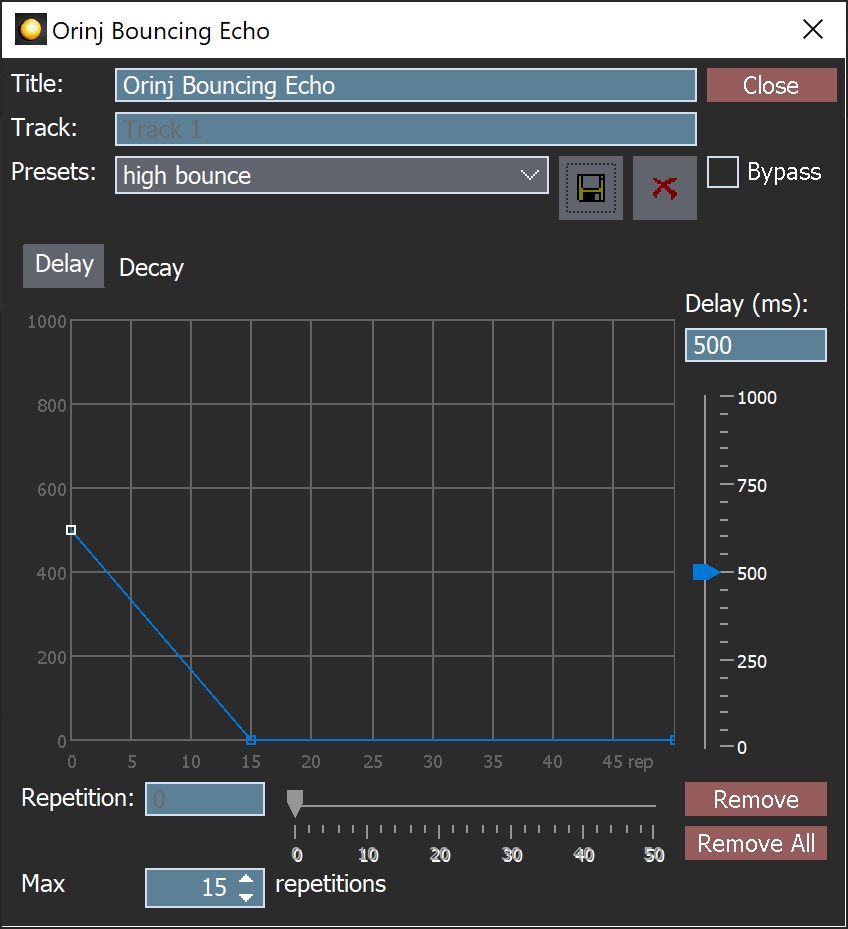
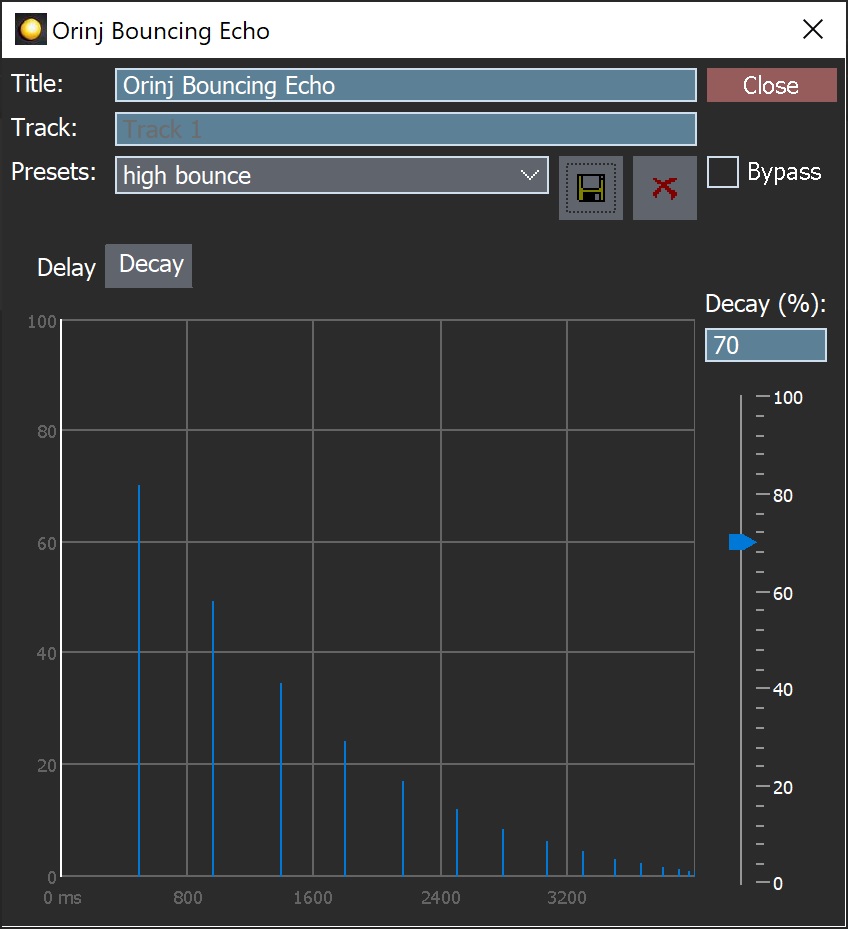
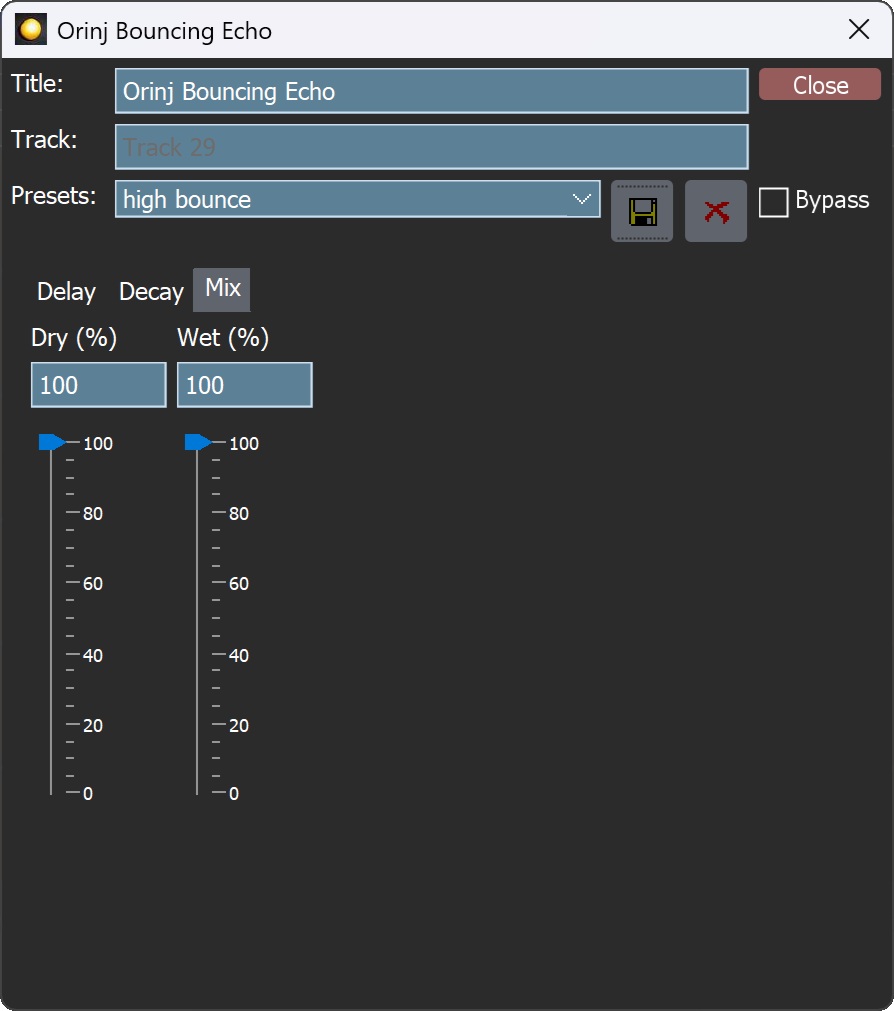
When this dialog becomes visible, the Orinj Bouncing Echo effect has been added. Adjust the parameters of the bouncing echo in the dialog above and click Close.
Orinj Bouncing Echo parameters
See Orinj Effects for an explanation of the Title, Track, Presets, and Bypass controls. The remaining Orinj Bouncing Echo controls are described below:
- Delay graph: This graph shows the delay for each repetition. In the graph above, for example, the delay decreases between the original signal and the 15th repetition from 500 milliseconds (ms) to zero milliseconds. These 15 repetitions resemble a bouncing ball. Use the graph to add additional points and to move points up and down and left and right. To add a point, click anywhere on the graph where you would like the point to appear. To move a point, click on that point and drag it.
- Repetition: Use these controls – the box and the slider – to set at which repetition the selected point should be placed. Each point can be placed at any repetition from 1 to 49. The two end points (the first one and the last one) cannot be moved left or right. In the dialog above, for example, the selected point is the first one and cannot be moved. It must remain at repetition 0. Thus, the repetition controls are disabled. If you click on a different point to select it (e.g., the point at repetition 15 above), these controls will become enabled. As you change these controls, the selected point in the top graph will move to the left or to the right.
- Delay: Use these controls – the box and the slider – to set the delay of the selected point in the top graph. As these controls change, the selected point will move up or down to show a larger or a smaller delay respectively. The delay at any point, at any of the repetitions from 0 to 50, can be changed when this point is selected. The delay for a specific point is the difference in time between the repetition at that point and the previous repetition. Repetition 0 shows the original signal. The delay is measured in milliseconds and can be between 0 ms and 1000 ms.
- Remove: Use this button to remove the selected point in the top graph. The first and last point of the echo cannot be removed. When this point is removed, nothing else in the echo changes. A new line will be drawn in the top graph between the points to the left and right of the removed point.
- Remove All: Use this button to remove all points in the top graph except for the two end points.
- Max repetitions: Use these controls – the box and the slider – to set the maximum number of repetitions that the echo should have. The maximum repetitions can be between 1 and 50.
- Decay graph: This graph shows the impulse response of the echo. These are the repetitions of the echo. In the example above, the bottom graph shows 15 repetitions with ever decreasing amplitude and with an ever-decreasing distance between them (decreasing delay).
- Decay: Use these controls – the box and the slider – to set the decay of the echo. The decay is measured in percent and can be between 0% (complete decay, zero repetition amplitude) and 100% (no decay, each repetition is of the same amplitude as the original signal).
- Dry mix: Use these controls – the box and the slider – to change the amplitude of the original signal. The dry mix is in percent and can be between 0% and 100%.
- Wet mix: Use these controls – the box and the slider – to change the amplitude of the repetitions. The wet mix is in percent and can be between 0% and 100%.
See Orinj Effects for additional notes on: where Orinj effects can be used, using boxes and sliders that control the same effect parameter, applying effects to mono and stereo waves, and using effects during playback. See Orinj Working with effects for additional information on creating, modifying, moving, and removing effects. See Delay effect for additional information on the different types of delay effects in audio processing.
Automations
The Orinj Bouncing Echo offers the following automations.
- Max repetitions: This automation adds or subtracts up to 50 from the maximum number of repetitions.
- Decay: This automation adds or subtracts up to 100% from the decay of the echo repetitions.
- Dry mix: This automation adds or subtracts up to 100% from the dry mix of the echo (the amplitude of the original signal).
- Wet mix: This automation adds or subtracts up to 100% from the wet mix of the echo (the amplitude of the repetitions).
Right-click on the corresponding controls to add or remove automations.
Add new comment